

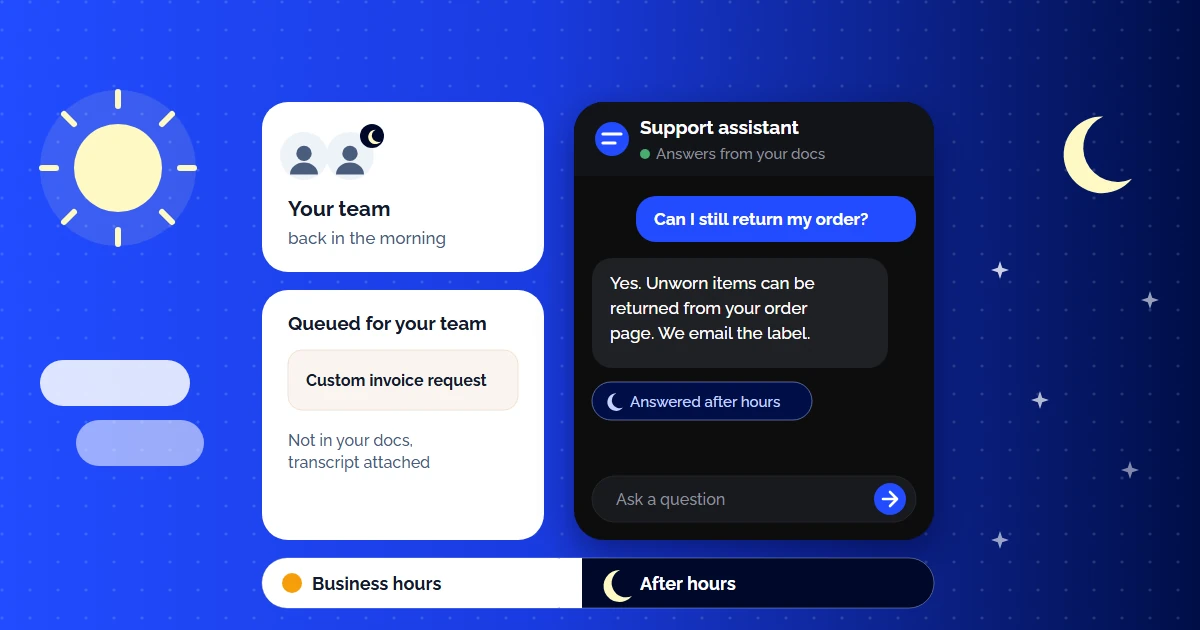
It is 2 AM on a Saturday. A customer in Tokyo is trying to upgrade their plan. Another customer in Berlin cannot figure out how to connect your API. A third in São Paulo wants to know your refund policy. Your support team? Asleep. All three customers will wait 6–14 hours for a response — if they have not already switched to a competitor by morning.
This is the reality for every startup and small SaaS team that does not offer 24/7 customer service. You know you need it. You also know you cannot afford to hire three shifts of support agents across multiple time zones. The math simply does not work at your stage.
But what if you could deploy an AI support agent that answers customer questions instantly — at 2 AM, at noon, on holidays — using your own documentation as the source of truth? Not a dumb chatbot that says "I do not understand, please rephrase." A RAG-grounded AI knowledge base that resolves queries in seconds with answers grounded in your docs.
The Real Cost of Not Offering 24/7 Customer Service
Most founders calculate the cost of 24/7 support in terms of salaries. But the hidden cost of NOT having it is far greater:
Lost Revenue from Abandoned Signups
A potential customer has a question during your product trial at midnight. No answer. They do not come back. You never know you lost them because there is no ticket — just a silent churn.
Morning Ticket Avalanche
Every question that goes unanswered overnight piles into your morning inbox. Your team starts every day already behind. First response times spike. Stress compounds.
Global Market Exclusion
If your support hours are 9 AM – 5 PM EST, you are effectively telling customers in Asia-Pacific and EMEA that they are second-class users. Competitors with 24/7 coverage win those markets.
Review and NPS Damage
Customers who wait 12 hours for a simple answer leave frustrated reviews. "Support is slow" becomes your brand identity on G2 and Trustpilot — even if your product is excellent.
According to Zendesk's CX Trends 2026 report, 74% of consumers say AI has made them expect customer service to be available 24/7. Not next business day. Not "within 24 hours."
Traditional 24/7 Options (and Why They Break for Startups)
Before AI, there were only three ways to offer 24/7 support. All of them have serious downsides for early-stage companies:
| Approach | Monthly Cost | Quality | Ramp Time | Scales? |
|---|---|---|---|---|
| Hire 3-shift team (in-house) | $10,500–21,000+ | High (product-trained) | 4–8 weeks | Linear cost growth |
| Outsource (BPO) | $3,000–8,000 | Variable (script-dependent) | 2–4 weeks | Limited by vendor |
| Global remote team | $6,000–15,000 | High (if trained well) | 3–6 weeks | Management overhead |
| AI Support Agent (RAG) | $49–199 | High (your own docs) | < 2 minutes | Infinite concurrency |
The math is stark. If one agent costs $3,500 a month (an example figure, so use your local rate), a 3-shift in-house team starts at $10,500+/month. CustomerGPT plans cost $49–349/month billed yearly, include 4,000 to 40,000 messages a month, and answer conversations in parallel. For a startup handling a few hundred to a couple of thousand tickets a month, that is a small fraction of one salary. Check the message limit against your volume before you pick a plan.
AI does not replace your human team — it handles the repetitive, well-documented queries so your humans can focus on complex issues, escalations, and relationship-building during business hours. The result: 24/7 coverage for common questions + expert human help during working hours.
Staffing the night
- Night-shift or follow-the-sun hires, plus shift premiums
- Rota management, holiday cover and burnout churn
- Quality drifts on the shifts nobody wants to work
- Cost grows step-wise with every time zone you add
AI first, humans on escalation
- Documented questions answered instantly at any hour
- Escalations queued with the full transcript for the morning
- The same answer quality at 03:00 as at noon
- Cost grows with volume, not with the number of time zones
How AI-Powered 24/7 Support Works (Architecture Overview)
A modern AI support system is not a scripted chatbot with pre-programmed responses. It uses a retrieval-augmented generation (RAG) pipeline to answer questions from your actual documentation in real time:
The Always-On Support Pipeline:
Help center URLs, PDFs, Notion pages, API docs — all crawled and chunked into semantic segments automatically.
Each chunk is converted into a vector embedding. Semantic search matches customer intent, not just keywords.
Customer asks a question at 3 AM. The system retrieves the most relevant doc chunks in milliseconds.
The LLM generates a natural response from the retrieved passages. Grounded in your verified content.
For a deeper technical dive into the RAG pipeline, including vector search and embedding architecture, read our guide to RAG for customer support. For the practical integration walkthrough, see our knowledge base chatbot integration guide.
What AI Handles at 2 AM vs What Waits for Your Team
The most common concern: "Will the AI give wrong answers at night when nobody is watching?" The answer: RAG-grounded systems only answer from your docs. If the answer is not in your documentation, the AI says "I do not have information on that" and creates a ticket for your morning team. Here is the division:
AI Handles Autonomously (24/7)
Escalates to Humans (Business Hours)
The key insight: the queries that hit at 2 AM are overwhelmingly the simple, repetitive ones. Complex issues tend to arise during business hours when customers are actively working with your product. Your AI handles the midnight questions; your humans handle the hard stuff during the day.
How to Set Up 24/7 AI Customer Service in Under 2 Minutes
Here is the practical setup using CustomerGPT (the process is similar across top-tier AI support platforms):
Connect Your Documentation
Paste your help center URL, upload PDFs, or link your Notion workspace. CustomerGPT automatically crawls and indexes everything — help articles, API docs, onboarding guides, billing FAQs. No manual tagging required.
Configure Your After-Hours Rules
Set your business hours, escalation triggers, and brand voice. During off-hours, the AI resolves queries autonomously and queues anything it cannot answer for your morning team — complete with conversation context and customer sentiment signals.
Test With Your Most Common Questions
Pull the last 30 days of support tickets. Ask the AI those exact questions. Verify that answers are accurate, properly sourced, and tonally appropriate. This quality gate takes 5 minutes and prevents embarrassing wrong answers at 3 AM.
Deploy and Go Live
Embed the chat widget on your website with a single script tag. Deploy to Slack for internal queries. The AI is now live 24/7 — answering questions across time zones while your team sleeps.
For a step-by-step technical guide on connecting different documentation sources, see our guide to setting up AI customer support on custom docs.
24/7 Support Economics: AI vs Human (Detailed Breakdown)
Here is a worked example for a SaaS startup processing 800 support conversations per month, where 35% of queries arrive outside business hours. It assumes the AI resolves 70% of those after-hours queries; replace that with the rate you measure on your own traffic:
| Line Item | Human Night Shift | AI Agent (CustomerGPT) |
|---|---|---|
| After-hours queries (35% of 800) | 280 tickets | 280 queries |
| Resolved without escalation | 280 (100% by agent) | 196 (70% by AI) |
| Escalated to morning team | 0 | 84 (30% complex) |
| Cost per resolution | $18–25 (night shift premium) | $0.05 per AI query |
| Monthly cost | $5,040–7,000 | $49 (flat) + $9.80 (AI queries) = $58.80 |
| Response time | 5–15 min (agent busy) | Seconds |
| Annual cost | $60,480–84,000 | $705.60 |
Annual savings: $59,774–83,294. That is not a rounding error — it is the salary of 1–2 full-time engineers you could hire instead. And the AI does not call in sick, does not need training updates, and handles 50 concurrent conversations as easily as one. For a full cost comparison, see our analysis of affordable AI customer support options for startups.
Real-World Scenarios: Who Needs 24/7 AI Support Most
SaaS with Global Users
If your customers span 3+ time zones, you are already leaving queries unanswered 16 hours per day. AI gives every time zone the same instant response quality.
E-Commerce / DTC
Shopping happens at night. Order status, return policies, and sizing questions peak after 8 PM. AI resolves these instantly, preventing cart abandonment and reducing next-day ticket backlog.
High-Growth Startups
You are growing faster than you can hire support agents. AI scales instantly — from 100 to 10,000 queries per month — with zero additional headcount.
Developer Tools / API Products
Developers code at night. API integration questions, error troubleshooting, and configuration help cannot wait until 9 AM. AI trained on your API docs answers in seconds.
Best Practices for 24/7 AI Support
The AI can only answer from your docs. Every undocumented FAQ = a ticket that AI cannot deflect. Dedicate 1 hour per week to turning common tickets into help articles.
Changed your pricing? Updated API endpoints? Added a new feature? Re-index your knowledge base immediately. Outdated answers at 2 AM erode trust faster than no answer at all.
Spend 10 minutes each morning reviewing what the AI handled overnight. Celebrate deflections. Fix wrong answers. Fill content gaps. This daily habit compounds into massive improvements.
If the share of escalated queries suddenly jumps above your normal baseline, say from 30% to 50%, something changed — maybe a product bug, maybe outdated docs. Catch it early with threshold alerts.
If you have users in Japan, Germany, and Brazil, your AI should respond in Japanese, German, and Portuguese. Modern LLMs handle multilingual support natively — just ensure your docs cover the same topics.
Conclusion: Your AI Agent Never Sleeps
The question is no longer "can we afford 24/7 support?" — it is "can we afford NOT to offer it?" Every hour you are offline is an hour where customers wait, competitors win, and revenue leaks.
AI-powered customer service does not replace your human team. It extends their reach to every time zone, every holiday, every 2 AM question that used to go unanswered until morning. Your humans handle the hard problems. Your AI handles everything else — instantly, accurately, and at a cost that makes a night shift team look like a relic.
Start by connecting your documentation to an AI knowledge base platform. If you want to build a self-service system that deflects tickets even during business hours, read our guide on reducing support tickets with a self-service knowledge base. The future of support is not more agents — it is smarter infrastructure.
Continue Reading
- AI Chatbot Trained on Your Own Data (No Code Required)
- AI Knowledge Base Software for Customer Support: Turn Docs Into a 24/7 Answer Engine
- Self-Service Knowledge Base: How to Reduce Support Tickets with AI
- Affordable AI Customer Support for Startups
- Best AI Customer Service Software for Small SaaS
- AI Customer Service Software: Complete Guide