
How to Train an AI Chatbot on Your Own Data
Paste your URL. CustomerGPT reads your site, help center, PDFs and docs, and answers your customers from them, and only from them.
14-day free trial · No credit card · Live in about 2 minutes
To train an AI chatbot on your own data, you do not retrain a model — you connect your content to one. Gather your sources (website, help center, PDFs, docs), let a crawler index them as vectors, test the answers against real questions, set guardrails and a human hand-off, then embed the widget. This is RAG — retrieval-augmented generation — and it takes about 2 minutes to set up, not weeks of fine-tuning.
What "trained on your data" actually means
There are three ways to make an AI chatbot use your content. For a support bot, only one of them is worth doing.
| Method | How it works | Setup cost | Update speed | Verdict |
|---|---|---|---|---|
| Prompt engineering | Paste context into the system prompt | Free | Instant | Breaks at scale |
| Fine-tuning | Retrain the model weights on your data | $10K–$100K+ ML team | Days to weeks per update | Overkill for support |
| RAG | Retrieves the relevant passages from your docs at query time | From $49/mo | Instant — re-crawl anytime | Right answer for support |
Fine-tuning teaches a model a style. RAG gives it facts to answer from. When a customer asks about your refund window, you want the second one — and you want it to change the moment you edit the policy page.
What you need before you start
Three questions decide whether the chatbot is useful on day one, and none of them are about the model.
What counts as training data
Anything that already answers a customer question in writing: help-center articles, product docs, the pricing page, shipping and refund policies, onboarding guides, release notes, PDF manuals, DOCX playbooks, and structured FAQ pairs. Marketing copy counts too, but it answers fewer questions than you think. Chat transcripts and tickets are the wrong material — they contain the questions, not the answers, and they carry customer data you should not upload.
How much data you need
Less than fine-tuning would need, because nothing is being learned — the content is looked up. A help center of 30–50 articles plus your pricing and policy pages covers most first-line questions for a small SaaS or store. The useful measure is coverage: does each recurring question have one page that answers it? If the answer to a common question exists nowhere in writing, adding a thousand other pages will not produce it.
Cleaning and structuring it
Content is split along its headings, so pages with one topic per heading retrieve cleanly and pages that bury three answers under one heading do not. Put the answer in the first sentence under the heading. Retire pages that contradict each other — two refund windows on two pages means the chatbot will use whichever one is closer to the question, and it will be right half the time. Dates and prices belong on one canonical page that the others link to.
How to train an AI chatbot on your own data, step by step
The no-code route. Six steps, about two minutes of waiting and an afternoon of testing.
Step 1: Gather the content you want it to answer from
List the places your answers already live: the help center, product docs, pricing page, policy pages, onboarding guides, and any PDF manuals or DOCX playbooks. You are collecting answers, not questions — the model needs the refund policy, not last month's refund tickets. Leave raw customer data, PII and payment details out.
If most of your knowledge is in people's heads, write it down first as short FAQ pairs. Twenty honest question-and-answer pairs beat a hundred pages of marketing copy, because the chatbot can only answer from what is written.
Step 2: Connect the sources
In the CustomerGPT dashboard, open Knowledge Base, paste your site or help-center URL into Crawl Website Links and click Crawl Link. Leave "Remove headers, footers, sidebars, and navigation links" ticked so menus do not end up in answers. Drop PDF, DOCX, TXT, MD or CSV files (up to 10 MB each) into the upload area below it. Content that lives in other tools comes in through Integrations: Google Drive, OneDrive, SharePoint, Notion, Zendesk and Intercom.
Start with the public site plus the help center. Add internal documents only after you have seen what the public content already answers — that keeps the first index small enough to test properly.
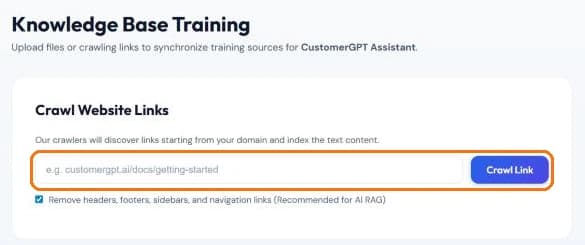
Knowledge Base → Crawl Website Links: paste a URL and the crawler follows links from there. 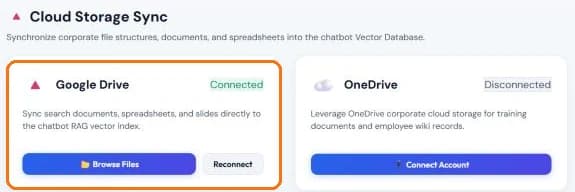
Integrations → Cloud Storage Sync: connect Google Drive once, then pick the files to index with Browse Files. Step 3: Let it index
Each page and document is parsed to clean text, split along its heading structure so a table or a procedure stays whole, and stored as vectors in your own tenant. Nothing is trained into the model; the content is retrieved when a question arrives.
A few hundred pages index in about two minutes. Each source then shows as COMPLETED under Trained Knowledge Sources, and you have a chatbot you can already ask questions of. A FAILED file is usually a scanned PDF without a text layer — run OCR on it and upload it again.
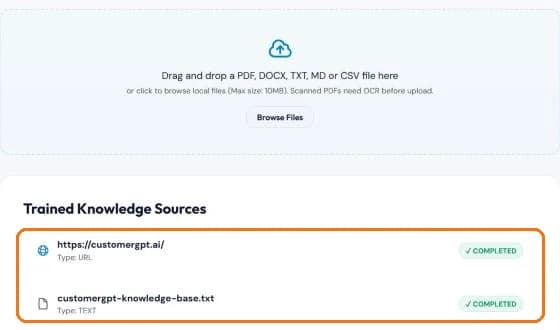
Trained Knowledge Sources: every crawled site and uploaded file with its indexing status. Step 4: Test it against real questions and find the gaps
Take the last fifty support tickets and ask the chatbot each one. Read each answer next to the page it should come from. Three outcomes are possible: right, wrong because the source is wrong, or "I don't know" because the source does not exist.
Every wrong answer traces to a document, so the fix is a documentation edit, not a model change. Every "I don't know" is a page you have not written yet — write it, re-crawl, ask again. Once real visitors are chatting, the Knowledge gaps report on the Dashboard keeps this list for you: the questions your knowledge base could not answer, how often each was asked, and the share left without an answer.
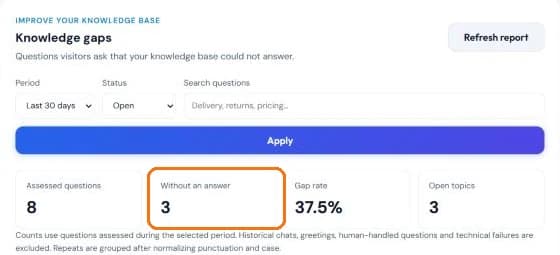
Dashboard → Knowledge gaps: the questions to write pages for next. Step 5: Set the greeting, limits and hand-off
The chatbot answers from your content and declines rather than improvises. In Customizer, give it a name, a welcome message and a few Quick Prompts — the questions visitors can tap instead of typing. Cap messages per conversation and per minute so nobody runs up your quota. Then decide what happens when the answer is not in your docs: collect an email, or open the chat in Chat History and click Take Over Chat to answer as a person.
The hand-off is what makes the chatbot safe to leave alone. A bot that escalates one question in ten is more useful than one that guesses at all ten.
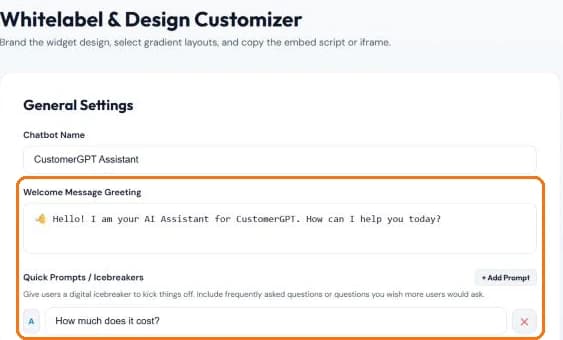
Customizer → General Settings: the greeting and Quick Prompts are the first thing a visitor sees. Step 6: Embed it and keep it current
Customizer → Get Embed Code gives you one script tag (with Lazy HTML, Next.js and iframe variants); paste it before the closing body tag of your site. Integrations puts the same chatbot in Slack and Telegram. From then on, editing a page in your docs changes the chatbot's answer after the next re-crawl — scheduled on Growth and Scale, manual on any plan.
Review the conversation log weekly. The questions the chatbot could not answer are your content backlog, ranked by how often customers ask.
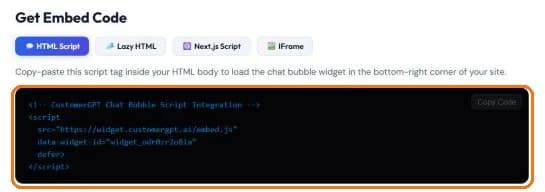
Customizer → Get Embed Code: the whole install is this one tag.
Four ways people ask for this
They are the same job with different starting material. Find yours.
“I want to train ChatGPT on my own data”
You can upload files to a Custom GPT, but it lives inside ChatGPT — your customer needs their own account and has to go there to ask. It will not sit on your site as a widget, and it will not re-read your pages after you edit them. Same idea, pointed at your own site instead.
“A chatbot trained on my PDFs and documents”
Drop in the PDFs, DOCX files and wiki exports. They are parsed to text, split along their heading structure so a table or a procedure stays in one piece, and indexed. A manual and a policy doc are the easiest possible starting material — no website required.
“A chatbot trained on my website”
Paste the URL and the crawler walks your help center, docs, pricing and blog on its own. This route needs the least work: nothing to export, nothing to upload, and a re-crawl picks up whatever you publish next.
“A custom GPT for customer support”
That is this page, in production form: an agent bounded to your content, embedded on your site, citing its source on every reply, and escalating to a human when the answer is not in your docs.
How your content becomes an answer
- 1IngestPages, PDFs and wiki exports are parsed into clean text and split along their heading structure.
- 2EmbedEach chunk becomes a vector that encodes meaning rather than keywords.
- 3RetrieveA question is embedded the same way, and the closest chunks in your tenant are returned.
- 4GenerateThe model answers from those chunks only, citing where each claim came from.
What you can train it on
- Website URLs and sitemaps — The crawler walks your help center, docs, pricing and blog and indexes them automatically.
- PDF documents — Product manuals, whitepapers, SOPs, compliance docs.
- DOCX and Word files — Onboarding guides, training material, sales playbooks.
- Notion and Confluence pages — Internal wikis, via API.
- FAQ pairs — Structured question-and-answer content the model can answer from with high confidence.
- Exported help-center articles — Resolved Zendesk or Intercom content, as context.
Where your data actually sits
- Your own tenant — Your vector store is isolated at the row level. Nothing crosses between customers.
- Never trained into the model — RAG retrieves; it does not change weights. Your content never enters the base model.
- Encrypted in both states — AES-256 at rest, TLS 1.3 in transit.
- Deletion is real deletion — Remove a document and its vectors are purged immediately — no residual knowledge.
- Injection guardrails — Multi-layer checks stop attempts to talk the model into dumping your knowledge base.
More detail in security and compliance and how the guardrails hold up against jailbreaks.
The other two tools you are probably comparing
Chatbase and CustomGPT.ai do the same core thing. The difference shows up in what a month of messages costs, and in how much product sits around the chatbot.
| CustomerGPT | Chatbase | CustomGPT.ai | |
|---|---|---|---|
| Entry price, billed yearly | $49/mo | $150/mo | $89/mo |
| Included at that price | 4,000 messages | 4,000 credits | 1,000 queries |
| Top self-serve tier | 40,000 messages at $349 | 15,000 credits at $500 | 5,000 queries at $449 |
| Trained on your own content | Yes | Yes | Yes |
| Scope | Inbound support only | Adds voice, telephony, outbound | Broader agent platform |
Competitor figures are list prices published on their own sites as of August 2026. Where they win — Chatbase on voice and outbound, CustomGPT.ai on breadth beyond support — is spelled out in full on CustomerGPT vs Chatbase and CustomerGPT vs CustomGPT.ai.
Tips for better answers
- Write for the question, not the feature — A page titled "Refunds" that opens with "You can request a refund within 30 days" retrieves for every phrasing of the refund question. A page titled "Our commitment to you" does not.
- One fact, one page — When a price or a deadline lives in three places, the chatbot uses the one nearest the question. Keep it in one place and link to it.
- Test with real tickets, not your own questions — You know where the answers are; customers do not. The last fifty tickets are the honest test set.
- Let it say "I don't know" — A bounded chatbot that escalates is trusted. One that improvises is switched off within a month.
- Re-crawl after every docs release — The index is only as current as the last crawl. Tie the refresh to your release process rather than remembering it.
- Read the unanswered log weekly — It is a ranked list of the pages your documentation is missing. Write the top three, re-crawl, repeat.
How long it takes
| Stage | No-code (this page) | Own RAG stack | Fine-tuning |
|---|---|---|---|
| First working chatbot | About 2 minutes | 1–3 weeks | 4–8 weeks |
| Testing and fixing docs | An afternoon | An afternoon | An afternoon, plus a retrain per fix |
| Updating after a docs change | Next re-crawl | Re-embed the changed pages | Retraining run |
| Who does it | Whoever owns the help center | One engineer | An ML team |
The two-minute figure is the crawl and index of a site of a few hundred pages. The testing afternoon is the same on every route, because it is about your documentation, not the technology. If you want the engineering detail behind the retrieval step, RAG for customer support walks through chunking, embeddings and retrieval.
What it costs
Billed yearly. No per-seat and no per-resolution fees — the allowance belongs to the plan. Full breakdown on pricing.
Questions people ask before starting
How do I train an AI chatbot on my own data?
Paste your website URL. The crawler reads your pages, help center, PDFs and DOCX files, splits them into passages, and indexes them as vectors in your own tenant. From that point the chatbot answers from your content only. There is no dataset to prepare and no code to write — the whole run takes about 2 minutes for a typical site.
Is this fine-tuning? Does my data go into the model?
No. Fine-tuning changes the model's weights; RAG does not touch them. Your content sits in your own vector store and is retrieved at question time, which is why editing a page changes the answer within seconds instead of requiring a retraining run. Nothing you upload becomes part of the base model.
How is this different from uploading files to a Custom GPT in ChatGPT?
A Custom GPT lives inside ChatGPT: to use it, your customer needs their own ChatGPT account and has to go there. It cannot sit on your site as a widget, and it does not re-crawl your pages when you edit them. This is the same idea pointed the other way — the agent sits on your own site, serves visitors who have no account anywhere, answers only from your pages, and re-indexes when your docs change.
What data can I train it on?
Website URLs and sitemaps, PDF documents, DOCX and Word files, Notion and Confluence pages, structured FAQ pairs, and exported help-center articles. What you should not upload is raw customer data — emails, PII, payment details. Upload the answers to common questions, not the questions themselves.
How does it avoid making things up?
The model is given only the passages retrieved from your content and is bounded to them. A wrong answer therefore traces back to a wrong or missing passage in your content, which you can fix. When your content has no answer, it says it cannot confirm one instead of guessing, and a visitor who asks for a person is handed to your team.
How much does it cost?
Starter is $49/month billed yearly and includes 4,000 messages, Growth is $99 with 10,000, and Scale is $349 with 40,000. Flat monthly rates — there are no per-seat and no per-resolution fees. The trial is 14 days with no credit card.
How much data do I need to train a chatbot?
Less than people expect. A help center of 30–50 articles plus your pricing and policy pages is enough for a chatbot that answers most first-line questions. What matters is coverage, not volume: one clear page per recurring question. If the same question is not written down anywhere, no amount of other content will let the chatbot answer it.
How long does it take to train an AI chatbot on my data?
Indexing a site of a few hundred pages takes about two minutes. The part that takes longer is the testing loop — asking it your real questions, fixing the documents it answered from, and re-crawling. Budget an afternoon for the first pass and a weekly half-hour after that to review what it could not answer.
Can I do this without coding?
Yes. The no-code route — paste a URL, upload files, embed a script tag — is what this page describes and is the right choice for a support chatbot. Writing your own RAG stack (a vector database, an embedding model, a retrieval layer) is only worth it if the chatbot is your product rather than a tool for your support team.
What happens when I update my documentation?
Re-crawl and the index updates. Growth refreshes monthly on a schedule, Scale re-scans daily and refreshes weekly, and any plan can trigger a manual refresh at any time. Deleting a document purges its vectors immediately — no residual knowledge stays behind.
Point it at your site
The crawler does the rest. You will have something to ask questions of in about two minutes.