

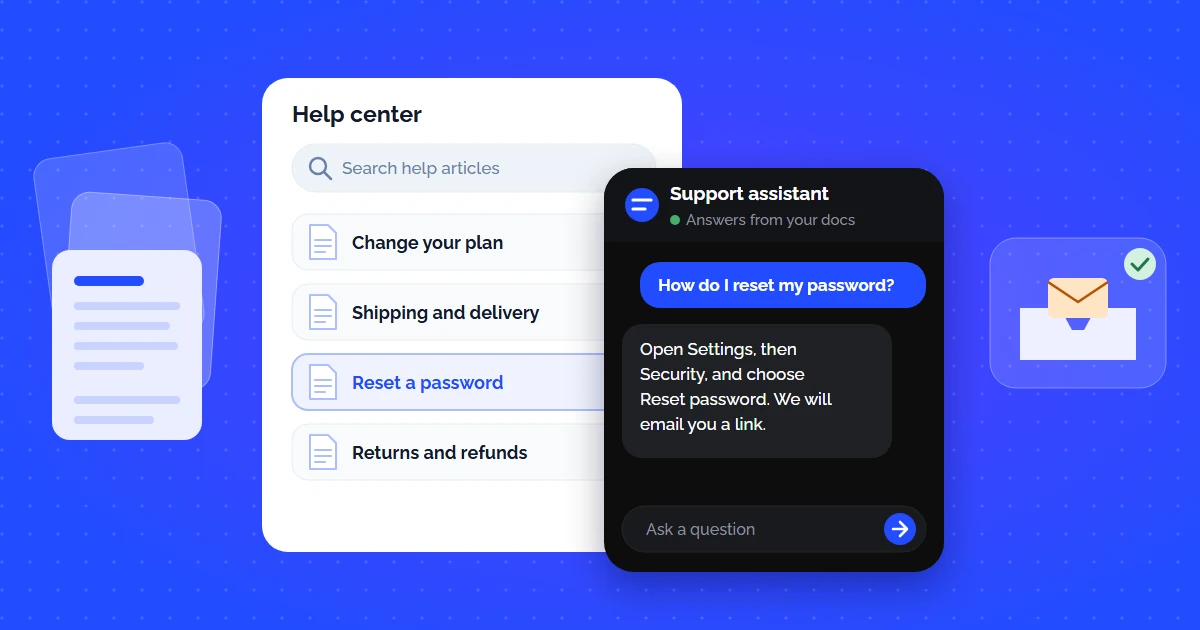
Your support inbox is drowning. Not in complex edge cases — in the same five questions your team has answered a thousand times. "How do I reset my password?" "What is your refund policy?" "How do I connect the API?"
You already wrote the answers. They are buried in your help center, scattered across Notion pages, or hidden in a PDF nobody reads. The problem is not missing documentation — it is that customers cannot find it fast enough and give up after 30 seconds of searching.
A self-service knowledge base powered by AI changes this equation entirely. Instead of keyword search that returns 15 irrelevant articles, customers ask a question in plain language and get an instant, source-verified answer — no ticket created, no agent involved, no wait time. If you have already explored how AI knowledge base software works, this guide focuses specifically on the ticket deflection architecture — how to measure it, maximize it, and build a self-service system that actually resolves queries instead of just displaying articles.
Why Your Current Self-Service Is Not Deflecting Tickets
Most companies technically "have" self-service. They have a help center page with 30 articles and a search bar. The problem: customers still submit tickets at the same rate. Here is why:
Keyword Search Is Broken
Customer types "cancel subscription." Your article is titled "Manage Billing Settings." Keyword search returns zero results. Customer submits a ticket.
Articles Are Too Long
Your 3,000-word guide covers everything about billing. The customer just needs one sentence about the cancellation button location. They do not want to read — they want an answer.
No Conversational Fallback
If the first article does not answer the question, there is no follow-up path. The customer clicks "Contact Support" immediately — self-service failed in under 10 seconds.
No 24/7 Availability
Static articles do not answer follow-up questions at 2 AM. If the self-service experience is "read this article and hope it helps," customers default to tickets.
According to Salesforce research, 61% of customers would rather use self-service for simple issues — but the catch is that most self-service does not finish the job: Gartner found that only 9% of customers report solving their issue completely through self-service. The gap between "we have a FAQ page" and "our self-service actually resolves queries" is where AI fits in.
What Makes an AI Self-Service Knowledge Base Different
An AI self-service knowledge base combines your existing documentation with retrieval-augmented generation (RAG) and vector search to provide an interactive, conversational layer on top of your help center. Instead of returning a list of articles, it extracts the exact answer from your docs and handles follow-up questions — all without human intervention.
The technology behind this is the same RAG pipeline we covered in our knowledge base chatbot integration guide: your documentation is chunked, vectorized, and stored as embeddings. When a customer asks a question, semantic search finds the most relevant chunks, and the LLM generates a natural-language answer grounded exclusively in your content.
The difference from a traditional chatbot is critical: there are no scripted decision trees, no manual intent mapping, no "I did not understand that, please choose from these options" dead ends. The AI understands the question semantically and retrieves the answer from your documentation — just like a senior support agent would, but in 3 seconds instead of 3 hours.
The Ticket Deflection Math: How Self-Service Cuts Support Volume
"Ticket deflection" sounds abstract until you run the numbers. Here is an illustrative model for a SaaS company processing 1,000 support tickets per month, assuming 60% of them are repetitive questions the docs already answer. Swap in your own share before you quote the result:
| Metric | Without AI Self-Service | With AI Self-Service |
|---|---|---|
| Monthly tickets | 1,000 | 400 (60% deflected) |
| Avg. first response time | 4.2 hours | Seconds (AI) / 2.1 hours (escalated) |
| Cost per ticket | $15–25 | $0.05 (AI) / $15–25 (human) |
| Monthly support cost | $15,000–25,000 | $6,030–10,030 |
| Agent burnout risk | High (repetitive work) | Low (complex-only queue) |
The math is straightforward: if 60% of your tickets are repetitive questions that already have documented answers, and your AI self-service resolves them instantly at $0.05 per query instead of $15+ per human-handled ticket, you save $9,000–15,000 per month on a 1,000-ticket volume. For growing startups, that is the difference between hiring two more support agents and not hiring any.
According to Gartner, by 2029 agentic AI will resolve 80% of common customer service issues without human agents. That is a forecast, not today's average. The key variable is documentation quality — better docs = higher deflection.
Illustrative model for a 1,000-ticket month, not a measured result from a specific account.
The per-ticket prices in that model are placeholders. To run it on your own cost per ticket and a deflection rate measured in a pilot, use the five inputs in our guide on how to reduce customer support costs with AI.
6 Self-Service Features That Actually Deflect Tickets
Not every "self-service" feature reduces ticket volume. These six are the ones that move the needle:
Conversational AI Widget (Not Just Search)
A chat-like interface where customers ask questions in natural language. The AI returns a direct answer — not a list of 10 articles. This is the feature that turns would-be tickets into self-resolved queries.
Follow-Up Question Handling
The customer asks 'How do I cancel?' AI answers. Then: 'Will I get a refund?' AI answers again from the refund policy doc. Multi-turn conversation eliminates the 'answer did not fully help → submit ticket' pattern.
Answers Bounded to Your Docs
When the docs do not cover a question, the AI says what it cannot confirm instead of guessing. A confident wrong answer costs more trust than an honest offer to bring in a person.
Proactive Suggestion Based on Page Context
The AI widget detects the customer is on the billing page and preemptively offers: 'Need help with invoices or plan changes?' Context-aware suggestions catch tickets before the customer even thinks to submit one.
Seamless Human Handoff with Context
When the AI cannot answer (no matching docs, complex issue, frustrated customer), it escalates to a human agent with the full conversation transcript. No cold handoff. No 'please explain your issue again.'
Unanswered Question Tracking
Every question the AI could not answer is logged as a content gap. This creates a feedback loop: fill the gap with new documentation → next time, the AI answers it → one fewer ticket, permanently.
How to Deploy an AI Self-Service Knowledge Base in 2 Minutes
The biggest misconception about AI self-service is that it requires a 6-month enterprise integration project. It does not. Here is the whole setup in CustomerGPT, screen by screen — about two minutes of indexing, then an afternoon of testing:
- 1
Feed it your help center
Open Knowledge Base, paste your help-center URL into Crawl Website Links and click Crawl Link. Keep "Remove headers, footers, sidebars, and navigation links" ticked so menu text does not leak into answers. PDF, DOCX, TXT, MD and CSV files (up to 10 MB each) go into the upload area below. If the help center lives in Zendesk or Intercom, or the wiki in Notion, connect it under Integrations → Knowledge Bases & Helpdesk Sync instead of exporting anything.
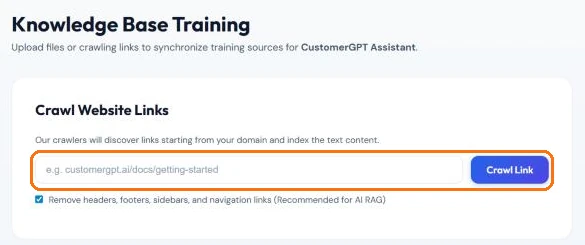
Knowledge Base → Crawl Website Links: one URL, and the crawler follows the links from there. 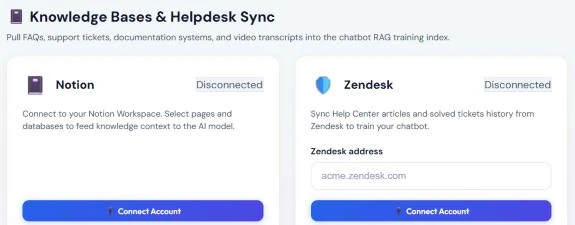
Integrations → Knowledge Bases & Helpdesk Sync: Notion pages and Zendesk Help Center articles feed the same index. - 2
Check what was indexed
Every source appears under Trained Knowledge Sources and turns COMPLETED once its pages are chunked and embedded — a few hundred pages take about two minutes. A FAILED file is usually a scanned PDF with no text layer: run OCR on it and upload it again, or the answers in it will never reach a customer.
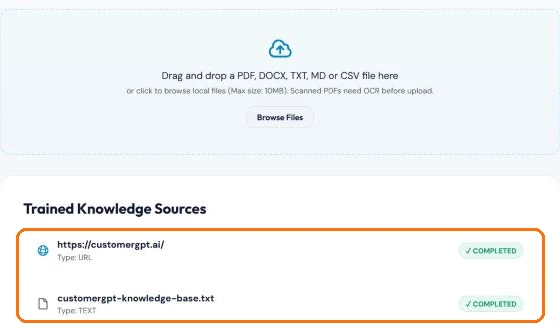
Trained Knowledge Sources: each crawled site and uploaded file with its indexing status. - 3
Test it with last month's tickets
Pull the 20 most common questions from last month's tickets and ask each one in the widget — put the embed code on a staging or unlinked test page first, so customers do not see it yet. Read every answer next to the page it should come from. A wrong answer points to a wrong page; an "I can't confirm that" points to a page you have not written. Both are documentation fixes, and both are cheaper to find now than after launch.
- 4
Put your top questions one tap away
In Customizer, set the chatbot's name and welcome message, then add your three most-ticketed topics as Quick Prompts — the buttons a visitor can tap instead of typing. That turns your biggest ticket sources into one-click answers. Cap Max Messages per Conversation and Messages per Minute so a spammer cannot burn your quota, and decide who picks up when the docs run out: an agent can open the chat in Chat History and click Take Over Chat.
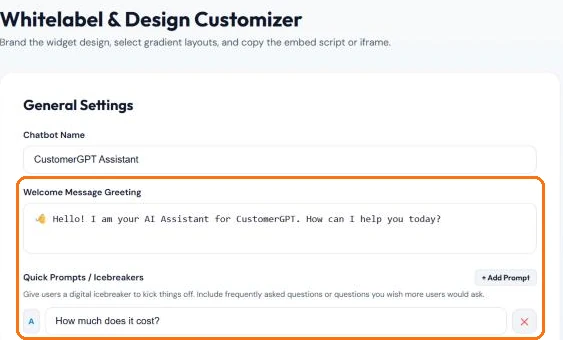
Customizer → General Settings: the greeting and Quick Prompts are the first thing a visitor sees. - 5
Embed the widget where tickets start
Customizer → Get Embed Code gives you one script tag, with Lazy HTML, Next.js and iframe variants. Paste it on the pages that generate tickets — billing, account settings, the API docs, onboarding — not only on the help center. Self-service deflects a ticket only if it is in front of the customer at the moment the question comes up.
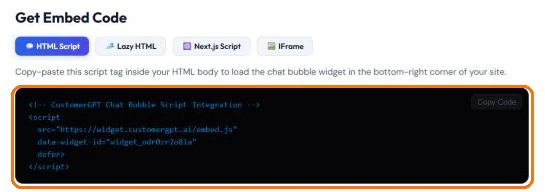
Customizer → Get Embed Code: the whole install is this one tag. - 6
Close the gaps every week
Once real visitors are chatting, open the Knowledge gaps report on the Dashboard. It lists the questions your knowledge base could not answer, how often each was asked, and the share of questions left without an answer. Write one short page per open topic, re-crawl, and mark it resolved. This loop is where the deflection rate actually comes from.
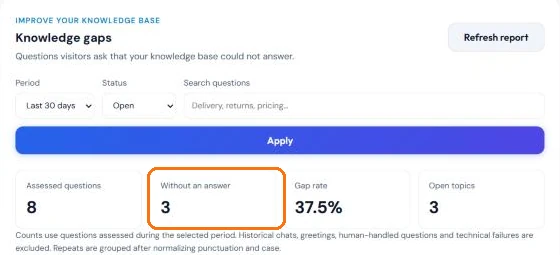
Dashboard → Knowledge gaps: your documentation backlog, ranked by what customers asked.
For a more detailed technical walkthrough of the RAG pipeline behind this setup, see our guide to RAG for customer support.
5 Metrics to Track Your Self-Service Success
Deploying a self-service knowledge base is step one. Proving it works requires tracking the right metrics:
Percentage of queries resolved by AI without human involvement. Set the target from your month-one baseline and judge the trend, not a vendor benchmark. Calculated as: (AI-resolved queries ÷ total queries) × 100. In CustomerGPT this is the Support Tickets Saved card on the Dashboard — chats resolved fully by AI.
How long from question to answer. AI self-service should resolve in seconds, not hours. Compare against your current human MTTR (industry average: 4+ hours for first response).
Percentage of self-service interactions where the customer did NOT subsequently submit a ticket. A low success rate means your AI is showing answers but they are not resolving the actual question.
Percentage of queries where the AI had no matching documentation. This is your content gap metric. Each unanswered question is a future article topic that will permanently deflect similar tickets. The Knowledge gaps report shows it as the gap rate, with the questions behind it.
Post-interaction satisfaction rating for AI-handled queries. Track separately from human-handled CSAT. If AI CSAT drops below human CSAT, investigate answer quality or coverage gaps. The Dashboard shows it as the thumbs-up and thumbs-down share of rated answers.
5 Mistakes That Kill Your Ticket Deflection Rate
Even with great AI, these mistakes keep your deflection rate well below what your docs could support:
| Mistake | Fix |
|---|---|
| Outdated documentation — your product changed, your docs did not | Set a monthly doc review cycle. Re-crawl after every product update. Stale docs = wrong answers = lost trust. |
| Hiding the self-service widget behind 3 clicks | Embed the AI widget on EVERY page. The fewer clicks to self-service, the more tickets you deflect. |
| No escalation path — AI says 'I cannot help' with no next step | Always offer a one-click handoff to a human agent with full conversation context. Dead ends create frustrated tickets. |
| Ignoring unanswered questions | Review unanswered queries weekly. Each one is a documentation gap. Fill it → next time AI answers it → permanent deflection. |
| Treating self-service as a set-and-forget project | Self-service is a flywheel: deploy → measure gaps → fill gaps → deflection rate climbs. Allocate 2 hours per week to optimization. |
Self-Service Knowledge Base vs Other Ticket Reduction Strategies
AI self-service is not the only way to reduce support tickets. But it is the most cost-effective for repetitive queries. Here is how it compares:
| Strategy | Setup Time | Deflection Impact | Ongoing Cost | Handles Follow-Ups? |
|---|---|---|---|---|
| AI Self-Service KB | < 2 min | High on repetitive, documented questions | $49–99/mo | Yes |
| Static FAQ Page | 1–2 hours | Low: the customer has to find the right article | Free | No |
| Rule-Based Chatbot | 2–4 weeks | Limited to the paths you script | $200–500/mo | Scripted only |
| Community Forum | 1–2 weeks | Depends on community activity | $50–200/mo | Peer-dependent |
| Hire More Agents | 4–8 weeks | 0% (absorbs, not deflects) | $3,500+/mo per agent | Yes |
The key insight: hiring more agents absorbs ticket volume but does not deflect it. Self-service eliminates the ticket before it is created. For teams exploring affordable options, see our breakdown of affordable AI customer support for startups.
Best Practices for Maximizing Ticket Deflection
Structure every help doc so each section answers exactly one question with a clear heading. 'How to cancel your subscription' as an H2 with a 2-sentence answer outperforms a 3,000-word billing guide.
Your help center, Notion wiki, PDF guides, and API docs should all feed into a single AI knowledge base. Fragmented sources = fragmented answers = missed deflections.
Every Monday, review unanswered questions from the previous week. Write a short doc for each gap. Every gap you close removes a source of repeat tickets.
Embed self-service on your billing page, settings page, API docs, and onboarding flow — not just the help center. The best ticket deflection happens before the customer even thinks of contacting support.
Changed your pricing? Updated an API endpoint? Re-index immediately. The number one cause of failed self-service is AI answering with outdated information.
Conclusion: Stop Answering the Same Questions Manually
Every ticket your team answers manually that could have been self-served is a double cost: the agent's time and the customer's patience. A self-service knowledge base powered by AI eliminates both by turning your existing documentation into an always-on, instantly-responsive answer engine.
The setup takes minutes. The ROI compounds weekly as you fill documentation gaps and the AI learns your content surface. Within 90 days, the unanswered-question log will have shown you which gaps to close, and your deflection rate will reflect how much of your volume the docs now answer — without hiring and without building decision trees.
If you are building your first AI self-service system, start by connecting your documentation to AI knowledge base software and integrating it into your live chat widget. The foundation is the same — the difference is the mindset: you are not building a help center, you are building a ticket prevention system.
Continue Reading
- AI Chatbot Trained on Your Own Data (No Code Required)
- AI Knowledge Base Software for Customer Support: Turn Docs Into a 24/7 Answer Engine
- Knowledge Base Chatbot Integration Guide: Connect Docs to Live Chat in 2 Minutes
- Affordable AI Customer Support for Startups
- 9 Best AI Chatbots for Customer Service in 2026
- How to Provide 24/7 Customer Service Without Hiring a Night Shift Team