

Every SaaS company writes help articles. Most of them sit unread while customers flood the support inbox with the same five questions over and over. Sound familiar?
The problem is not a lack of documentation — it is discoverability. Customers do not want to search through a static FAQ page. They want to ask a question in natural language and get a precise, contextual answer in seconds. That is exactly what AI knowledge base software does.
If you have been exploring how to build an AI chatbot trained on your own data, think of AI knowledge base software as the next evolution: instead of a chatbot bolted onto generic GPT, you get a purpose-built answer engine that is grounded exclusively in your documentation — grounded answers and instant resolution.
What Is AI Knowledge Base Software?
AI knowledge base software is a platform that combines your existing company documentation (help center articles, PDFs, Notion pages, API docs, internal wikis) with large language models and vector search technology to deliver instant, accurate answers to customer questions.
AI knowledge base software ingests your company documentation, converts it into vector embeddings, and uses retrieval-augmented generation (RAG) to answer customer questions using only verified content from your own docs — not the open internet.
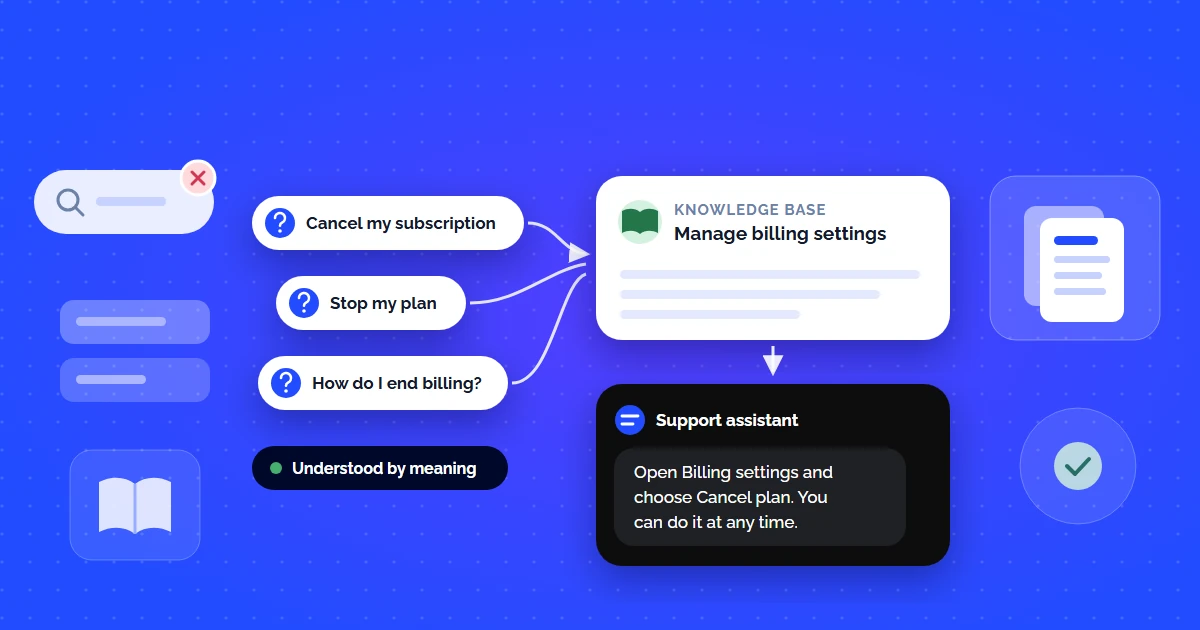
Unlike traditional knowledge bases (Zendesk Guide, Freshdesk KB, Help Scout Docs) that rely on keyword search and static article lists, AI-powered systems understand semantic intent. A customer can ask "how do I cancel my subscription" and get the right answer even if your documentation uses the phrase "manage billing settings."
Does the Growth plan include SSO?
Yes. SAML single sign-on is included on Growth and above. SCIM user provisioning is Enterprise only.
Can I test it before upgrading?
You can enable SSO in a sandbox workspace during a 14-day trial without changing your billing plan.
Why Traditional Knowledge Bases Are Not Enough Anymore
Static knowledge bases were revolutionary in 2015. In 2026, they are a bottleneck. Here is why:
Keyword Search Fails
Customers use natural language. Keyword search returns 15 irrelevant articles. They give up and submit a ticket.
Not Available 24/7
Static articles do not answer follow-up questions. If the first article misses the mark, the customer is stuck until business hours.
No Deflection Metrics
You know how many views an article got. You do not know how many tickets it prevented. Zero attribution.
Content Silos
Your docs live in Notion. FAQs in Zendesk. API docs on ReadMe. The customer has to search three places.
According to Salesforce research, 61% of customers would rather use self-service for simple issues — but only if the self-service tool actually works. The gap between "we have a knowledge base" and "our knowledge base resolves queries" is where AI fits in.
7 Must-Have Features in AI Knowledge Base Software
Not all AI knowledge base tools are equal. When evaluating options, look for these non-negotiable capabilities:
Multi-Source Ingestion
URLs, PDFs, Notion, Google Docs, Confluence — the tool must ingest documentation from wherever you store it, not just its own editor.
Semantic (Vector) Search
Keyword search is not enough. The system must use embeddings and cosine similarity to match intent, not just exact terms.
RAG-Grounded Responses
Every answer must come from your documents. No open-internet guesswork. No made-up policies. Just your docs.
No-Code Setup
If it takes a week to configure, you have already lost. A good tool deploys in minutes with zero engineering time.
Multi-Channel Deployment
Website widget, Slack, WhatsApp, API — your AI agent must live where your customers already are.
Conversation Analytics
Which questions are customers asking? What percentage is deflected? Where are the content gaps? Data drives improvement.
Human Escalation Path
AI handles routine queries. Anything complex or sensitive gets seamlessly escalated to a human agent with full conversation context.
5 Best AI Knowledge Base Software for Customer Support (2026)
We evaluated the top AI knowledge base platforms on setup speed, RAG accuracy, pricing, and integrations. Here is how they compare:
| Platform | Setup Time | RAG Grounding | Starting Price | Best For |
|---|---|---|---|---|
| CustomerGPT | < 2 min | Full RAG | $49/mo | Startups, SaaS, speed |
| Intercom Fin | 30–60 min | RAG-based | $74/seat + $0.99/resolution | Mid-market teams |
| Zendesk AI | 1–3 hours | Partial (agent assist) | $89/agent/mo | Enterprise, existing Zendesk users |
| Freshdesk Freddy | 30 min | Article suggestions only | $55/agent/mo (Pro) | Budget enterprise |
| Help Scout + AI | 15 min | Draft-assist, not autonomous | $75/user/mo | Small teams wanting simplicity |
If you are a startup or small SaaS team looking for affordable AI customer support, the key differentiator is not features — it is time to value. Can you go from zero to live AI agent in under 2 minutes? That matters more than a 200-feature comparison chart.
How to Set Up AI Knowledge Base Software in Under 2 Minutes
Here is the step-by-step setup using CustomerGPT as an example (the process is similar across top-tier platforms):
Connect Your Knowledge Sources
Paste your website URL, upload PDFs, or connect Notion/Confluence. CustomerGPT automatically crawls, chunks, and indexes every page — from API docs to help center articles to internal wikis.
AI Builds Vector Embeddings
The platform converts your documentation into high-dimensional vector embeddings. When a customer asks a question, semantic search finds the most relevant content chunks — even when the exact words do not match.
Test and Customize
Ask your AI agent the top 10 questions your customers ask. Refine the tone, set boundaries (what topics to avoid), and customize the widget to match your brand.
Deploy Everywhere
Embed the chat widget with a single script tag, deploy to Slack for internal teams, connect to WhatsApp for customer messaging, or use the API to build custom integrations.
For a deeper walkthrough on building a custom AI support agent from scratch, check out our complete guide to building an AI chatbot trained on your own data.
Real-World Use Cases: What AI Knowledge Base Software Actually Solves
E-Commerce
Automate order status, return policy, and sizing questions. Keep ticket volume flat during peak seasons.
SaaS Products
Answer "how do I integrate with X" and "what are the API limits" questions instantly from your technical documentation.
Healthcare / Legal
Surface policy documents and compliance information to internal teams without exposing sensitive data externally.
Education / Onboarding
New employees get instant answers from internal wikis. New customers complete onboarding without waiting for a support call.
Best Practices for Maximizing Your AI Knowledge Base
Structure your docs so each section answers one specific question. Use clear headings. The AI will retrieve better content.
Stale docs = wrong AI answers. Set a monthly review cycle. Re-crawl your knowledge base after every product update.
Every question the AI cannot answer is a content gap. Track these weekly and fill them with new documentation.
Do not let docs live in 5 places. Feed everything into one AI knowledge base — Notion, Confluence, PDFs, and your website.
Pull the last 50 support tickets. Ask your AI those exact questions. Measure accuracy before going live.
Conclusion: Your Docs Are Already Your Best Support Agent
You have already written the documentation. The help articles exist. The FAQs are there. The problem was never content — it was accessibility. AI knowledge base software bridges that gap by turning static documents into an intelligent, conversational, always-on support system that answers customer questions in real time using your own verified content.
For startups and small SaaS teams, this is not a luxury — it is a competitive advantage. While a support queue makes customers wait hours for a reply, your AI agent answers a documented question in seconds.
If you are comparing platforms, start with what matters: our comparison of the 9 best AI chatbots for customer service includes detailed benchmarks. For teams focused on cutting ticket volume first, read our guide to self-service knowledge bases and ticket deflection.
Continue Reading
- Self-Service Knowledge Base: How to Reduce Support Tickets with AI
- Knowledge Base Chatbot Integration Guide: Connect Docs to Live Chat
- How to Provide 24/7 Customer Service Without Hiring a Night Shift Team
- How to Build an AI Chatbot Trained on Your Own Data
- 9 Best AI Chatbots for Customer Service in 2026
- Affordable AI Customer Support for Startups