

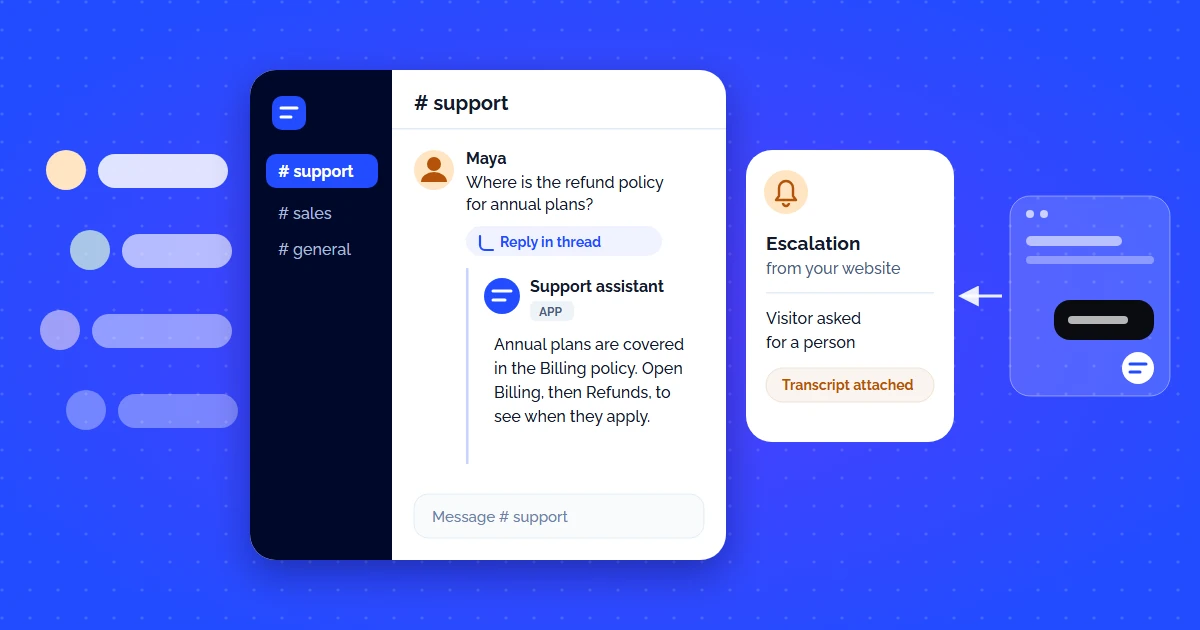
Your team already lives in Slack. Your customers ping support channels. Internal teams ask product questions. Partners need onboarding help. The last thing you need is another dashboard — you need an AI customer support bot that connects directly to Slack and answers questions using your own documentation, in real time, inside existing threads.
But not every bot that claims "Slack integration" actually delivers. Some require complex API setups. Some only push notifications without responding. And most use generic LLMs that hallucinate answers from the open internet instead of your verified knowledge base.
This guide breaks down the criteria that matter, compares the top platforms, and walks you through setting up a production-ready Slack AI bot in under 2 minutes.
Why Slack Is the #1 Channel for AI Customer Support
According to Salesforce's State of the Connected Customer report, 76% of B2B buyers now expect real-time responses in the channels they already use. For SaaS, fintech, developer tools, and agency teams, that channel is Slack.
Traditional support models force users to leave their workflow: open a browser, navigate to a help center, submit a ticket, wait for an email reply. A Slack-connected AI support bot eliminates every step of that friction. The user types a question in a Slack channel, and the AI answers — in seconds, inside the thread.
Zero Context Switching
Users get answers without leaving Slack. No browser tabs, no ticket portals, no email waits. Support happens where work happens.
Thread-Native Replies
The best bots reply inside Slack threads — keeping channels clean and conversations contextual, not flooding the main feed.
Shared Team Visibility
When an AI answers in Slack, the whole team sees it. Knowledge compounds — others learn from the answers without asking again.
6 Criteria for Evaluating an AI Support Bot for Slack
Not every "Slack bot" is built the same. Here is what separates a production-grade AI support bot from a toy demo:
| Criteria | What to Look For | Red Flag |
|---|---|---|
| Native Integration | Direct Slack app install from workspace — no Zapier, no iframe | "Connect via Zapier webhook" |
| RAG Grounding | Answers come ONLY from your uploaded docs, not the open internet | Generic ChatGPT wrapper with no source control |
| Thread Replies | Bot responds inside the thread where the question was asked | Sends DMs or posts in a separate channel |
| Setup Speed | Minutes from install to first answer | Requires API keys, custom code, or dev team |
| Analytics | Dashboard showing questions asked, answered, escalated, and gaps | No visibility into what the bot is answering |
| Escalation | Auto-routes unanswerable questions to a human with context | Silently drops questions it cannot answer |
Top AI Customer Support Bots with Slack Integration (Compared)
We evaluated the leading platforms that offer AI support bots with Slack connectivity. Here is how they stack up:
| Platform | Native Slack | RAG-Grounded | Thread Replies | Setup Time | Starting Price | Best For |
|---|---|---|---|---|---|---|
| CustomerGPT | ~2 min | $49/mo | SaaS, startups, SMBs | |||
| Intercom Fin | ~30 min | $0.99/resolution | Mid-market, PLG | |||
| Zendesk AI | Partial | Limited | ~1–2 hrs | $55/agent/mo + AI add-on | Enterprise, existing Zendesk users | |
| Freshdesk Freddy | Via marketplace | Partial | ~1 hr | $55/agent/mo (Pro) | Teams on Freshworks stack | |
| Tidio Lyro | ~15 min | $29/mo | E-commerce, small sites |
Key takeaway: If Slack is your primary support channel, look for platforms with native Slack app integration (not third-party connectors), RAG-grounded answers, and thread-level replies. Generic widget-only chatbots with Slack "notifications" do not count.
How to Set Up CustomerGPT in Slack (Step-by-Step)
Here is how to go from zero to a working AI support bot in your Slack workspace in under 2 minutes:
Create Your Knowledge Base
Sign up at CustomerGPT, create a new chatbot project, and upload your docs — paste URLs, upload PDFs, or connect Google Drive. The system crawls, chunks, and embeds everything automatically.
Connect Slack
Go to Integrations → Slack → "Add to Slack". Authorize the app in your workspace. Select the channels where you want the bot to listen and respond.
Test and Deploy
Ask a test question in the connected channel. The bot replies in-thread with a RAG-grounded answer. Adjust the system prompt, tone, and escalation rules from the dashboard.
That is it — no API keys, no custom code, no DevOps. For a deeper walkthrough on preparing your documentation for AI ingestion, see our guide on how to set up AI customer support on custom docs.
Does our SOC 2 report cover the EU region?
Yes. The current Type II report covers both the US and EU regions, and the EU sub-processor list is in appendix B. Report was issued in March.
Can I send it to a prospect?
It goes out under NDA - request the signed copy through the trust portal and it is emailed automatically. I can post the link here.
Real-World Use Cases: Where Slack AI Bots Shine
Customer Shared Channels
B2B SaaS teams running Slack Connect channels with clients can deploy an AI bot that answers product questions 24/7 — no human on-call required. The bot pulls from your docs and responds in the shared channel thread.
Internal IT / HR Helpdesk
Point the bot at your internal wiki, HR policies, or IT runbooks. Employees ask in #it-help or #hr-questions, and the AI answers instantly, so questions your docs already cover stop turning into internal tickets.
Developer Support Communities
Open-source projects and API platforms train the bot on API docs, changelogs, and SDK references. Developers get instant answers in community Slack channels without waiting for maintainers.
Common Pitfalls When Choosing a Slack AI Bot
- Zapier-only integrations — These add latency, break on rate limits, and cannot maintain thread context. Always prefer native Slack apps.
- No RAG grounding — If the bot uses vanilla GPT without your data, it will hallucinate. Customers will get wrong answers and blame your team. See our breakdown of how AI answer engines work and why grounding matters.
- Channel-flood bots — Bots that post replies in the main channel (not threads) create noise. Insist on thread-native replies.
- No analytics — Without visibility into what the bot answers, you cannot improve accuracy or identify knowledge gaps. Demand a conversation dashboard.
- Per-resolution pricing at scale — $0.99/resolution sounds cheap at 100 questions/month. At 5,000 questions/month, that is $4,950/mo — more than most enterprise plans.
Bottom Line: What to Choose
If your team operates in Slack and you want an AI support bot that answers from your own docs — not the open internet — here is the decision framework:
- Best overall for SaaS and startups: CustomerGPT — native Slack, RAG-grounded, 5-minute setup, flat-rate pricing starting at $49/mo.
- Best for mid-market with existing Intercom: Intercom Fin — strong AI, but per-resolution pricing scales fast.
- Best for enterprise with existing Zendesk: Zendesk AI — deep ticketing integration, but setup is complex and AI is an add-on cost.
For a broader comparison of AI support tools beyond Slack, read our complete guide on the 9 best AI chatbots for customer service in 2026.