Home>Blog>AI Support
AI Support

How to Ask AI a Question (And Actually Get the Right Answer Every Time)

AR
Alex Rivera
Published on August 5, 202610 min read
Share this article:
TL;DR / Quick Summary: Asking an AI question effectively is a skill. Millions of people ask AI a question every day, but vague prompts yield generic responses. By applying role prompting, context anchoring, and constraint boundaries, you turn any AI into a precision research partner. Furthermore, when companies deploy AI for customer support or internal docs, custom grounding is required to ensure accurate AI answers.
How to Ask AI a Question — CustomerGPT

Whether you use ChatGPT, Claude, or an automated support bot, learning how to ask AI a question correctly is the single biggest factor determining response quality. When users complain about unhelpful responses, the issue is almost never model capability—it is prompt ambiguity.

Why the Way You Ask an AI Question Matters

Large Language Models (LLMs) operate on probabilistic pattern matching. When you enter a vague query, the model predicts text based on broad, generic internet data. When you frame your AI question with specific context, boundaries, and formatting instructions, the search space narrows to precise, high-value patterns.

The Golden Rule of AI Prompting

An AI model will mirror the clarity of your input. Generic inputs produce generic outputs. Structured inputs produce expert analysis.

5 Golden Rules When You Ask AI a Question

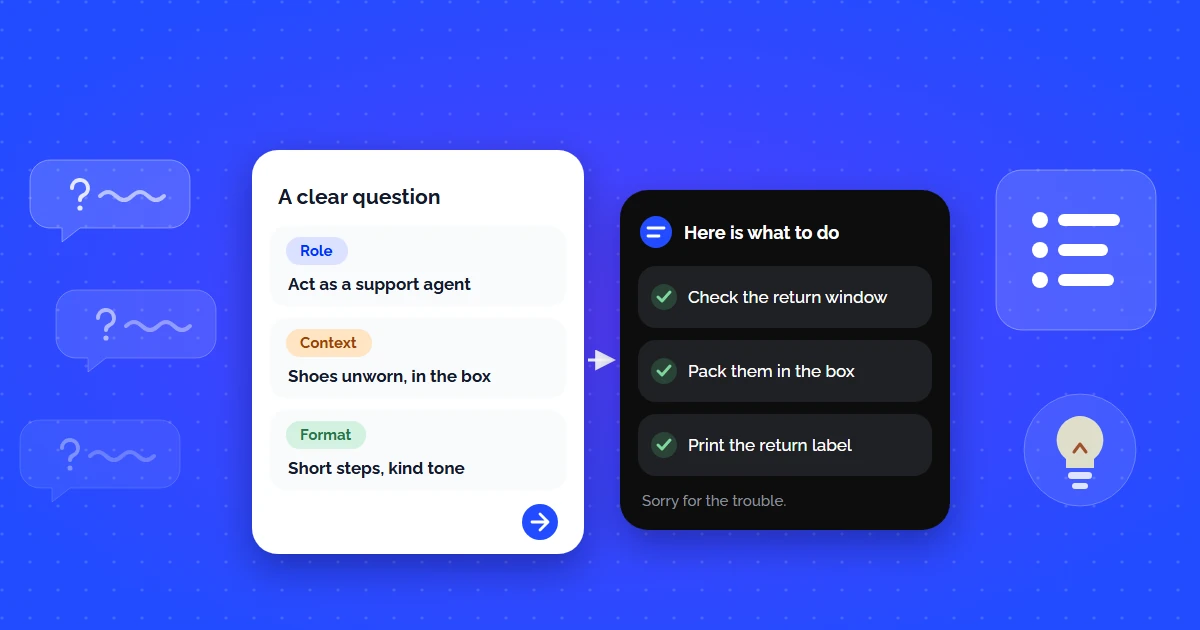
1. Assign a Persona

Start by telling the AI who it is: "Act as a senior DevOps engineer" or "Act as an e-commerce support specialist."

2. Provide Context

Never ask in isolation. Include background info, constraints, tech stack details, or target audience specs.

3. Define Output Format

Request bullet points, a markdown table, JSON schema, or step-by-step numbered lists to prevent wall-of-text responses.

Poor Prompt vs High-Converting AI Question

Notice how adding constraints dramatically transforms the resulting ai answer:

Prompt ElementWeak AI QuestionHigh-Converting Prompt
Query phrasing"How do returns work?""Act as support agent. Explain our 30-day return policy in 3 steps for an upset customer."
Response TypeVague wall of textActionable bullet points + clear next steps
AccuracyGeneric assumptionsStrictly grounded in provided document context
Figure — Same topic, two questions
AI assistantonline

How do I fix my API error?

I would need more detail - which endpoint, which status code, and what you were sending. There are several unrelated causes.

no context to work from

I get a 429 on POST /v1/search after about 30 requests in a minute, using a Starter key. What is the limit and how should I back off?

Starter allows 60 requests per minute per key. Retry using the Retry-After header with exponential backoff and jitter, and batch queries where you can.

api/rate-limits
specific, answerable, cited
The second question carries context, constraints and the shape of the answer wanted. That is the entire difference between the two replies.

When Public AI Answer Engines Aren't Enough for Business

While general AI assistants are great for broad queries, businesses need a system that answers questions based strictly on company knowledge. Asking public AI models about internal refund policies, proprietary API endpoints, or shipping rules results in hallucinations.

This is where custom AI answer engines powered by Retrieval-Augmented Generation (RAG) come in. With CustomerGPT AI agents, your visitors can ask questions and receive instant, grounded responses directly from your docs.

Let Your Customers Ask AI Anything About Your Product

Deploy a custom CustomerGPT chatbot trained on your documentation, PDFs, and website links in less than 5 minutes.

References & Sources

  1. OpenAI: Prompt Engineering Best Practices
  2. Anthropic: Constructing Effective Prompts for Claude
  3. Google DeepMind: Prompting Techniques for Large Language Models
  4. Nielsen Norman Group: AI User Experience & Intent Formulation (2025)

Frequently Asked Questions

How do I ask an AI a question and get a useful answer?

State the goal, supply the context the model cannot see, and name the output you want. Most poor answers come from missing context rather than a weak model: asking whether something is covered fails, while naming the policy, the item, and the timeframe succeeds.

Why does the AI give different answers to the same question?

Language models sample from probability distributions, so wording, ordering, and prior turns all shift the output. Grounded systems reduce this by retrieving the same source passages every time, which is why business-facing answers should cite documents rather than rely on the model's memory.

What makes a question too vague for AI?

Anything that assumes knowledge the model does not have: your product names, your policies, your account state. Add the missing facts to the question, or use a system indexed on your documentation so that context is retrieved automatically instead of being typed each time.

Should I use public AI tools for business questions?

Not for anything customer-facing. Public assistants have no access to your policies, pricing, or documentation, so they answer plausibly rather than correctly. For business questions, use a system grounded in your own indexed content that cites a source for every claim it makes.

How do I check whether an AI answer is trustworthy?

Ask for the source. Grounded systems return citations you can open and verify, while ungrounded ones produce confident prose with nothing behind it. If an answer cannot be traced to a document, treat it as a draft rather than a fact, especially for policy or pricing.

Can customers ask AI questions about my product directly?

Yes, and that is exactly what a documentation-grounded widget does. Visitors ask in their own words, the system retrieves the relevant passage from your indexed content, and it answers with a source link in 95+ languages without your team fielding the same question again.

Ready to deploy secure, custom AI agents?

Train your ChatGPT experts in seconds on manual links, files, and PDFs. Get started for free.

Build Your Chatbot Free