
HubSpot Service Hub charges per seat on every paid plan, and its AI agent, Customer Agent, needs Professional or Enterprise: $90 per seat a month billed yearly, a required $1,500 onboarding fee, and $0.50 per resolution paid from HubSpot Credits. If you want customers answered by AI without that bill, the seven tools below are the HubSpot alternatives for customer service worth a look, starting with one that can keep sending leads into the HubSpot CRM you already use. We compared what each costs, what its free plan includes, where AI is extra, and when Service Hub is still the better choice.
Quick Comparison: HubSpot Service Hub Alternatives
| Tool | Best for | Free plan | Paid from | Key difference | Review |
|---|---|---|---|---|---|
| CustomerGPT | AI answers from your own docs, with or without HubSpot CRM | 14-day trial, then 1 chatbot and 100 AI messages/mo | $49/mo flat, billed yearly | AI on every plan; sends leads to HubSpot CRM from Growth | Read review → |
| Zendesk | Teams moving to a dedicated ticketing suite | Free trial only | $19/agent/mo, billed yearly | Live chat from $55/agent; AI agents billed per resolution | Read review → |
| Freshdesk | Traditional ticketing on a tighter per-agent budget | 14-day trial, no free plan | $19/agent/mo, billed yearly | First 500 AI Agent sessions included, then $49 per 100 | Read review → |
| Zoho Desk | Small teams on a budget, especially on Zoho CRM | 3 users, email ticketing | $7/user/mo, billed yearly | Knowledge base from $14; live chat only on Enterprise | Read review → |
| Help Scout | Email-first teams that want a simple shared inbox | 5 users, 100 contacts/mo | $25/user/mo, billed yearly | HubSpot integration on Plus; Envoy AI at $0.75 per resolution | Read review → |
| Intercom | SaaS teams that want AI and a human inbox in one product | Free trial only | $29/seat/mo, billed yearly | Fin AI Agent from $0.99 per outcome, on top of seats | Read review → |
| Tidio | Small stores and sites with low chat volume | 50 conversations/mo | $24.17/mo, billed yearly | Priced by conversations; Lyro AI is an add-on from $32.50/mo | Read review → |
Plans and prices as listed on each vendor's pricing page on October 26, 2026. Vendors change them often, so check the pricing page before you buy.
1. CustomerGPT
CustomerGPT is an AI agent that answers your customers from your own content: website pages, help-center articles and files. Instead of buying a seat for everyone who might answer a chat, you pay one flat price, and the AI answers the repeat questions itself and passes the rest to a person.
Best for: SaaS, e-commerce and service teams whose support is mostly questions the docs already answer, including teams that run HubSpot CRM for sales and marketing and only need Service Hub for chat.
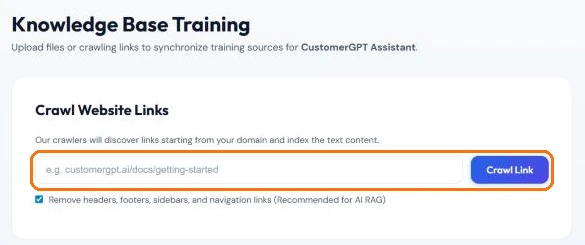
- Trains on what you already have: crawl your site or your public HubSpot knowledge base from one URL, or upload PDF, DOCX, TXT, MD or CSV files.
- Sends every chat lead with an email to HubSpot CRM as a new or updated contact, with a qualification summary (Growth plan and above, any HubSpot plan including free).
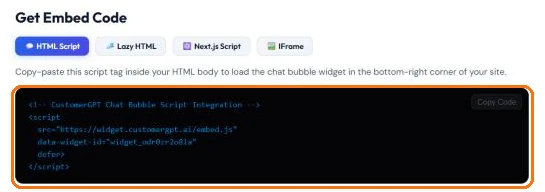
- Goes live with a single script tag, about two minutes after you paste your URL.
- Answers in 95+ languages.
- Hands the chat to your team when a visitor clicks Speak to a Human Agent; you reply from Chat History.
From $49 / month, billed yearly
$59 month-to-month. Starter: 1 team member, 4,000 messages a month. Growth ($99 billed yearly, $129 monthly): 4 team members, 10,000 messages, integrations including HubSpot. Scale ($349 billed yearly, $429 monthly): 10 team members, 40,000 messages, webhooks and Zapier. AI on every plan, no per-seat or per-resolution fees, no onboarding fee.
Free: a 14-day full-access trial with no credit card, then a free tier with 1 chatbot, 100 pages of content and 100 AI messages a month (no API or integrations).
Watch out for: each plan has a monthly message limit. When it runs out, the bot stops answering until the count resets or you add 5,000 messages for $49/month. It is not a help desk either: there are no ticket queues, SLAs, or email and phone channels.
Why Teams Choose CustomerGPT
“Cheaper than Service Hub” is a claim, so here is the arithmetic. Professional is the cheapest Service Hub plan that includes Customer Agent; monthly prices on a yearly plan, from each pricing page on October 26, 2026:
| Team size | Service Hub Professional, seats only | CustomerGPT, AI included |
|---|---|---|
| 1 person | $90/mo | $49/mo (Starter, 4,000 messages) |
| 4 people | $360/mo | $99/mo (Growth, 10,000 messages) |
| 10 people | $900/mo | $349/mo (Scale, 40,000 messages) |
The Service Hub column is seats only. Add the required one-time $1,500 Professional Onboarding, and Customer Agent at $0.50 per resolution, paid from HubSpot Credits (Professional includes 3,000 a month). CustomerGPT's limit is message volume, not people. To be fair the other way: if you only need a ticket inbox and live chat without AI, Service Hub Starter, from $7 per seat a month billed yearly, costs less than any CustomerGPT plan.
Price follows volume, not headcount
A new teammate does not add a seat fee. Plans include 1, 4 or 10 team members, and there is no onboarding fee.
AI on every plan, not a top tier
No plan gate and no per-resolution charge. Even the free tier after the trial answers with AI.
HubSpot CRM stays in the loop
On Growth and above, chat leads land in HubSpot as contacts, matched by email, so sales keeps one record.
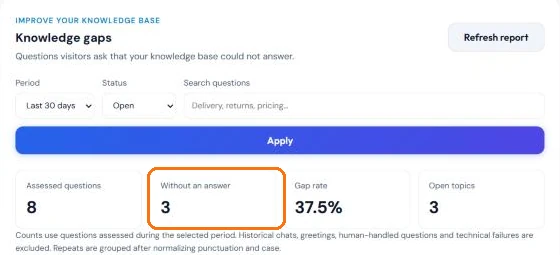
CustomerGPT vs HubSpot Service Hub
Service Hub is a help desk built on HubSpot's CRM; CustomerGPT is an AI agent that sits in front of your support and can feed that same CRM. Here is what changes when you switch, including what you lose.
| Feature | CustomerGPT | HubSpot Service Hub |
|---|---|---|
| Pricing | Flat per plan, from $49/mo billed yearly | Per seat: Starter from $7, Professional $90, Enterprise $150 per seat/mo, billed yearly |
| Onboarding fee | None; live in about 2 minutes | Required, one-time: $1,500 on Professional, $3,500 on Enterprise |
| Free option | 14-day trial, then a free tier (1 chatbot, 100 AI messages/mo) | Free plan for up to 2 users |
| AI answers for customers | Included on every plan | Customer Agent on Professional and Enterprise, $0.50 per resolution from HubSpot Credits |
| CRM | Sends leads to HubSpot CRM from Growth; other CRMs through webhooks or Zapier on Scale | Built on HubSpot's Smart CRM |
| Channels | Website widget; Slack and Telegram from Growth | Customer Agent covers chat, email, forms and calling |
| Human handoff | Speak to a Human Agent; your team replies from Chat History | Native help desk with tickets; advanced routing on Enterprise |
What you give up
- A full help desk: ticket queues, SLAs and routing
- Email, forms and phone as support channels
- Handoff alerts: CustomerGPT does not send email or push notifications for handoffs yet
- Two-way CRM sync: CustomerGPT writes contacts to HubSpot, but does not read them back or create tickets or deals
What you gain
- AI answers on every plan, with no per-resolution fee
- One flat price instead of a seat for every agent, and no onboarding fee
- An assistant built from content you already have, live in about 2 minutes
- Answers in 95+ languages
How to switch, and keep HubSpot CRM
- Export first. Before you downgrade Service Hub, export the knowledge base articles and the ticket history you want to keep.
- Train CustomerGPT on your help content. Crawl your public knowledge base URL, or upload the exported articles as files. A crawl reads up to 50 pages, so crawl each section of a large help center separately.
- Connect HubSpot CRM. On Growth and above, open Integrations → HubSpot CRM → Connect Account, then turn on Send contacts and qualification summaries to HubSpot in Sales Automation.
- Make it yours. Set the bot's name, greeting and colour in the Customizer, then paste the embed script on your site.
- Decide who answers handoffs. Someone has to watch Chat History. On Scale, the
conversation.escalatedwebhook can forward each handoff to Slack or a help desk through Zapier, Make or n8n.
For what Service Hub costs as a team grows, see the HubSpot Service Hub pricing breakdown; for the lead setup step by step, the HubSpot integration guide.
2. Zendesk
Zendesk is the help desk most teams weigh Service Hub against: ticketing, messaging, a help center and voice in one suite, without HubSpot's marketing and sales tools around it.
Best for: Teams moving to a dedicated ticketing suite.
Strengths
- Mature ticketing, routing, triggers and reporting
- Messaging, live chat, AI agents, a knowledge base and telephony on Suite Team ($55/agent/month, billed yearly)
- An email-only Support Team plan from $19/agent/month for teams that do not need chat
Weaknesses
- Every agent is a paid seat
- AI agents are billed per automated resolution, and Copilot adds $50/agent/month
- Setup is a configuration project: routing, triggers, help center and team training
From $19/agent/mo
Billed yearly. Live chat and messaging start on Suite Team at $55/agent/month.
When it is the better choice: Choose it over CustomerGPT if you are leaving Service Hub for a dedicated help desk and need queues, SLAs and phone support, not only AI answers. See what Zendesk costs once AI is on.
3. Freshdesk
Freshdesk covers the same help desk ground as Service Hub, with ticketing, a shared inbox, a customer portal and a knowledge base, for less per agent than Service Hub Professional.
Best for: Traditional ticketing on a tighter per-agent budget.
Strengths
- Growth plan from $19/agent/month, billed yearly
- Ticketing, shared inbox, customer portal and knowledge base from the first paid plan
- Freddy AI Agent on every plan, with the first 500 sessions included
Weaknesses
- Still priced per agent
- AI Agent sessions past the first 500 cost $49 per 100; Freddy AI Copilot is $29/agent/month on Pro and Enterprise
- Intelligent routing and multiple SLA policies need Pro at $55/agent/month
From $19/agent/mo
Billed yearly. Pro $55 and Enterprise $89 per agent per month.
When it is the better choice: Choose it over CustomerGPT if you want a traditional help desk like Service Hub for less per agent, and people will still answer most tickets. See CustomerGPT vs Freshdesk.
4. Zoho Desk
Zoho Desk is the low-cost way out of Service Hub: free for three users and paid plans from $7 per user. It fits best when the rest of your stack is already Zoho.
Best for: Small teams on a budget, especially on Zoho CRM.
Strengths
- A free plan with 3 user licenses and email ticketing
- Express from $7/user/month, billed yearly, with generative AI on your own model key
- Zia AI, telephony and multiple departments on Professional ($23/user/month, billed yearly)
Weaknesses
- The knowledge base and answer bot start on Standard ($14/user/month, billed yearly)
- Live chat comes through Zoho SalesIQ on Enterprise ($40/user/month, billed yearly)
- Every user is a paid seat once you leave the free plan
From $0
Free for 3 users. Paid plans from $7/user/month, billed yearly.
When it is the better choice: Choose it over CustomerGPT if your team answers every ticket itself, works mostly by email and wants the cheapest per-user help desk, especially next to Zoho CRM.
5. Help Scout
Help Scout is the simpler option for teams that mostly answer email: a shared inbox, a Docs knowledge base and live chat, with far less to configure than Service Hub.
Best for: Email-first teams that want a simple shared inbox.
Strengths
- Free for 5 users with 1 inbox and 1 Docs site
- Live chat, SMS and social channels from Standard ($25/user/month, billed yearly)
- Keeps HubSpot data alongside: the HubSpot integration is on Plus ($45/user/month, billed yearly)
Weaknesses
- The free plan stops at 100 contacts a month
- Unlimited AI Drafts need Plus, and the Envoy AI agent costs $0.75 per resolution on top of seats
- Priced per user on every paid plan
From $0
Free for 5 users. Paid plans from $25/user/month, billed yearly.
When it is the better choice: Choose it over CustomerGPT if people answer most of your support by email and you want an inbox that is easy to run, with HubSpot data next to it on Plus.
6. Intercom
Intercom pairs its Fin AI Agent with a shared inbox, ticketing and a help center, so AI and people work in one product. It is the closest match to Service Hub Professional with Customer Agent switched on.
Best for: SaaS teams that want AI and a human inbox in one product.
Strengths
- Fin AI Agent included in every plan, handing off to your team in the same inbox
- Messenger, shared inbox, ticketing and a public help center on Essential
- Fin can also run on top of another help desk, with no Intercom seats
Weaknesses
- Fin is billed from $0.99 per outcome, on top of seats
- Workflows and round-robin assignment need Advanced ($85/seat/month, billed yearly)
- Copilot is free for only 10 conversations per agent a month
From $29/seat/mo
Billed yearly; new customers are offered Essential at $19. Fin from $0.99 per outcome.
When it is the better choice: Choose it over CustomerGPT if you want AI and a full human inbox in one tool and are comfortable paying per seat and per outcome. See the Intercom pricing breakdown.
7. Tidio
Tidio puts live chat, ticketing and a simple chatbot in one widget, and counts conversations rather than seats, which suits a small team with modest volume.
Best for: Small stores and sites with low chat volume.
Strengths
- A free plan with 50 billable conversations a month
- Live chat and ticketing in one widget
- Priced by conversation volume rather than per seat
Weaknesses
- 50 conversations a month is fewer than 2 a day
- Lyro AI is a one-off 50 conversations, then an add-on from $32.50/month billed yearly for 50 AI conversations
From $0
Free for 50 conversations a month. Starter $29/month, or $24.17/month billed yearly. Lyro AI extra.
When it is the better choice: Choose it over CustomerGPT if you get only a handful of chats a week and want live chat in an inexpensive widget. See CustomerGPT vs Tidio.
Frequently Asked Questions
What is the best HubSpot Service Hub alternative?
It depends on what you use Service Hub for. For AI answers from your own docs at a flat price, while keeping HubSpot CRM, choose CustomerGPT. For a full help desk, Zendesk or Freshdesk. For the lowest per-user price, Zoho Desk, which is free for 3 users. For an email-first shared inbox, Help Scout. For AI and a human inbox in one product, Intercom. For a small online store, Tidio.
How much does HubSpot Service Hub cost in 2026?
On HubSpot's pricing page on October 26, 2026: Free for up to 2 users; Starter from $7 per seat a month billed yearly; Professional $90 per seat a month billed yearly ($100 on monthly billing with an annual commitment) plus a required one-time $1,500 onboarding; Enterprise $150 per seat a month billed yearly plus $3,500 onboarding. Customer Agent, HubSpot's AI agent, needs Professional or Enterprise and is listed at $0.50 per resolution, paid from HubSpot Credits.
Is CustomerGPT cheaper than HubSpot Service Hub?
For AI answers, yes. Customer Agent needs Service Hub Professional, which costs $360 a month for 4 seats and $900 for 10 on yearly billing, before the $1,500 onboarding and the per-resolution AI charge. CustomerGPT costs $99 a month on Growth (4 team members, 10,000 messages) and $349 on Scale (10 team members, 40,000 messages), billed yearly, with AI answers included. If you only need a ticket inbox without AI, Service Hub Starter costs less.
Can I keep HubSpot CRM and use CustomerGPT?
Yes. On CustomerGPT's Growth plan and above, connect HubSpot under Integrations and turn on lead delivery in Sales Automation. When a visitor leaves an email in a chat, CustomerGPT creates or updates the HubSpot contact, matched by email, with their name, phone, company and a qualification summary. It works with any HubSpot plan, including the free CRM. The sync is one-way and creates contacts only, not tickets or deals.
Does HubSpot Service Hub have a free plan?
Yes. HubSpot's free plan covers up to 2 users with no credit card, but Customer Agent is not part of it: HubSpot requires Professional or Enterprise for that. Among the alternatives, Zoho Desk is free for 3 users, Help Scout for 5 users up to 100 contacts a month, and Tidio for 50 conversations a month. CustomerGPT has a 14-day trial with no card, then a free tier with 1 chatbot and 100 AI messages a month.
How do I migrate from HubSpot Service Hub?
Export your knowledge base articles and the ticket history you want to keep before you downgrade. Bring the help content into the new tool first, because it drives the answers. In CustomerGPT, crawl your public knowledge base URL or upload the exported articles as files, connect HubSpot CRM if you keep it, and check the answers against your docs before you remove HubSpot's chat widget.
Does CustomerGPT replace HubSpot's help desk?
No. CustomerGPT answers customers from your content and hands the conversation to a person when the visitor clicks Speak to a Human Agent; your team replies from Chat History. It has no ticket queues, SLAs, or email and phone channels, and it does not send email or push alerts for handoffs yet. Teams that need those keep a help desk and put CustomerGPT in front of it.
Which Tool Is Right for You?
Start from what you actually use Service Hub for: AI answers, a ticket queue, or an inbox for people.
Choose CustomerGPT if most of your support is questions your docs already answer and you want them answered automatically, without a seat fee for every person on the team, while HubSpot CRM keeps collecting your leads. If your team lives in tickets, queues and phone calls, keep a help desk and put CustomerGPT in front of it.
See how it answers your customers
Paste your site URL and try CustomerGPT free for 14 days. No credit card required.