Every AI customer support system that actually works — not a scripted chatbot, not a generic ChatGPT wrapper — is built on the same foundational technology: vector search.
If you have ever asked a chatbot a question and gotten a relevant, accurate answer grounded in your company's documentation, vector search is the engine that found the right information. If you have ever gotten a hallucinated answer or an irrelevant response, vector search either was not implemented or was implemented poorly.
This guide explains how to automate customer support using vector search — from the math behind embeddings to production architecture, chunking strategies, and scaling from 100 documents to 50,000.
What Is Vector Search (And Why Keywords Fail for Support)
Traditional search engines match keywords. If a user types "how to reset my password" and your doc title is "Account Recovery Instructions," keyword search returns zero results — because none of the words match.
Vector search solves this by comparing meaning, not words. Here is how:
Step 1: Embeddings
Text is converted into a high-dimensional vector — a list of ~1,536 numbers that represent the semantic meaning of the text. Two sentences about "resetting a password" will have similar vectors, even if they use completely different words.
Step 2: Cosine Similarity
To find the most relevant docs, the system measures the angle between the question vector and every document vector. Smaller angle = higher similarity. This is cosine similarity — the mathematical core of semantic search.
Step 3: HNSW Index
Comparing against every vector is slow at scale. HNSW (Hierarchical Navigable Small World) graphs create a layered index that finds the nearest neighbors in logarithmic time — millisecond searches across millions of vectors.
The result: when a customer asks "I can't log in to my account," vector search retrieves your "Account Recovery Instructions" doc — because the meaning matches, even though zero keywords overlap.
The Full RAG Architecture: From Question to Answer
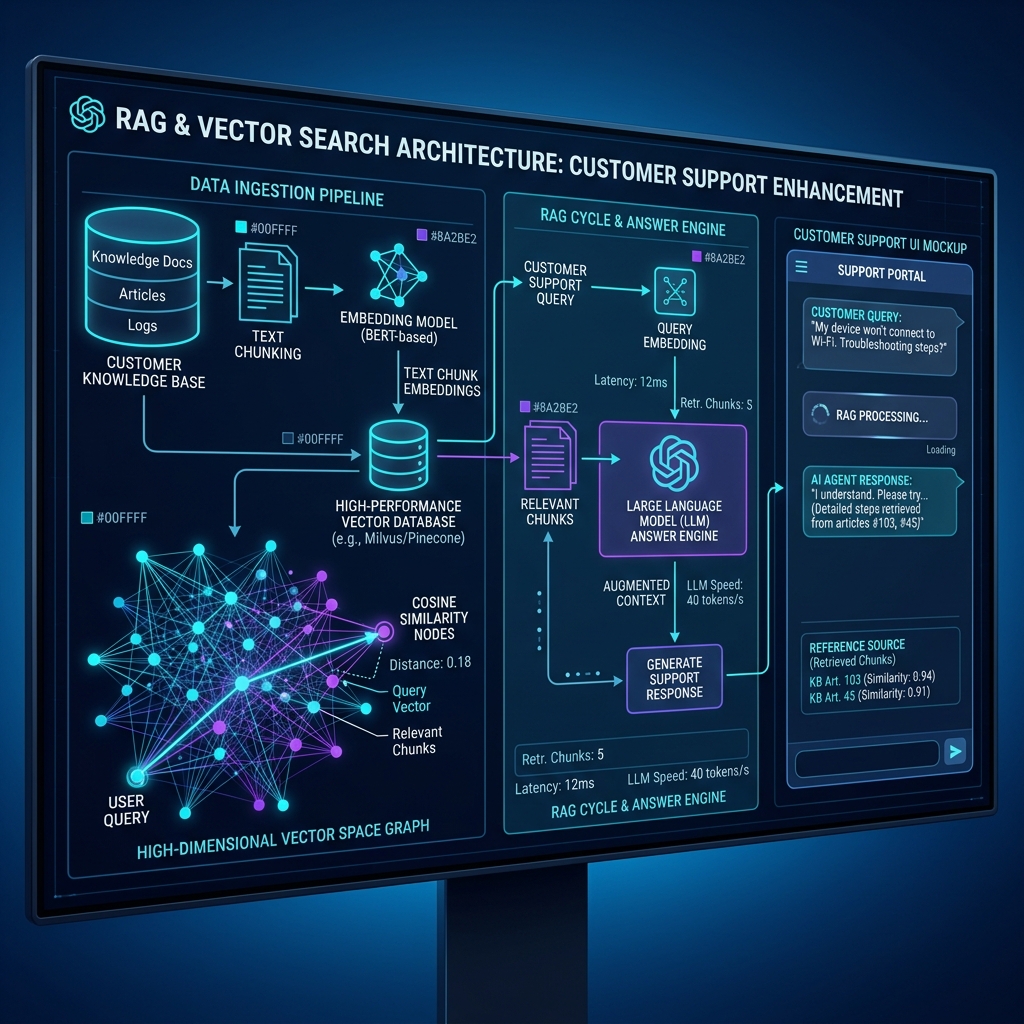
Vector search alone finds relevant documents. But you need a Retrieval-Augmented Generation (RAG) pipeline to turn those documents into a natural-language answer. Here is the complete flow:
"How do I connect my Stripe account to receive payments?"
The question is converted into a vector using the same embedding model used to index your docs (e.g., text-embedding-3-small).
The vector database finds the top 3–5 most semantically similar document chunks via cosine similarity on the HNSW index.
Retrieved chunks are injected into the LLM's system prompt as context: "Answer using ONLY the following context: [chunk 1] [chunk 2] [chunk 3]"
The LLM (GPT-4, Claude, etc.) reads the context and generates a natural-language answer. If the context does not contain the answer, a properly guardrailed system says "I don't have that information."
This is exactly how AI answer engines work — and why they can answer accurately without fine-tuning. The LLM does not memorize your docs; it reads them fresh every time, in the prompt context.
Chunking Strategies: The Hidden Key to Accuracy
Chunking is how you split your documents into smaller pieces before embedding. It is the single biggest factor in retrieval quality — and the most commonly misconfigured.
| Strategy | How It Works | Best For | Pitfall |
|---|---|---|---|
| Fixed-size | Split at every N tokens (e.g., 300) with overlap | Quick prototyping, uniform content | Cuts mid-sentence; loses context |
| Recursive / Semantic | Split at paragraph and heading boundaries, recursively subdivide | Structured docs, help centers | Needs well-structured source docs |
| Hierarchical | Parent-child chunks: large context chunk + small retrieval chunk | Complex docs, long articles | More complex to implement |
| Sentence-window | Embed single sentences, but retrieve surrounding window of N sentences | FAQs, Q&A pairs, short docs | Poor for long-form explanations |
For a deeper look at how CustomerGPT handles hierarchical chunking at scale, read our engineering deep dive on scaling vector databases to ingest 50K pages under 2 seconds.
Choosing a Vector Database
Your vector database is where the embeddings live and where similarity searches execute. Here are the production-grade options:
PostgreSQL + pgvector
If you already run Postgres, add the pgvector extension. HNSW indexes, cosine/L2/inner-product distance. Zero new infrastructure.
Best for: Teams already on PostgreSQL. What CustomerGPT uses internally.
Pinecone
Managed vector DB as a service. Zero-ops, auto-scaling, metadata filtering. Fast to start, but vendor lock-in and costs scale with vector count.
Best for: Teams wanting zero infrastructure overhead.
Weaviate / Qdrant
Open-source, self-hosted vector databases with rich filtering, hybrid search (vector + keyword), and built-in vectorization modules.
Best for: Teams wanting full control and hybrid search capabilities.
Key Metrics for Vector-Search-Powered Support
Once your vector search pipeline is live, track these metrics to measure and improve performance:
| Metric | What It Measures | Target |
|---|---|---|
| Retrieval Precision@5 | Of the top 5 chunks retrieved, how many are actually relevant? | >80% |
| Answer Accuracy | Is the generated answer factually correct per source docs? | >95% |
| Hallucination Rate | AI generating claims not present in retrieved context | <2% |
| Latency (P95) | End-to-end time from question to displayed answer | <3 seconds |
| Deflection Rate | Questions resolved by AI without human escalation | >70% |
| Coverage Gap Rate | Questions where no relevant chunks exist in the index | <10% |
Scaling: From 100 to 50,000 Documents
Vector search architectures face different challenges at different scales:
Small (100–1,000 docs)
Brute-force cosine similarity works fine. Any vector DB (including pgvector) handles this with default config. Focus on chunking quality, not infrastructure. Most small SaaS teams live here.
Medium (1,000–10,000 docs)
HNSW indexes become critical for sub-100ms search. Implement metadata filtering (by doc type, product, language) to narrow search scope. Consider hierarchical chunking for better precision.
Large (10,000–50,000+ docs)
Multi-tenant isolation, sharded indexes, embedding cache layers, and two-stage retrieval (coarse recall → fine reranking with cross-encoder models). This is where dedicated vector DBs or heavily optimized pgvector setups matter.
CustomerGPT handles the full spectrum — from solo founders with 10 help articles to enterprise teams with 50,000+ pages — with automatic scaling, hierarchical chunking, and edge-optimized embedding caches. Read our engineering deep dive: How We Ingest 50K Documentation Pages Under 2 Seconds.
Build vs Buy: Should You Roll Your Own?
The full vector search + RAG pipeline requires:
- Document ingestion (crawling, PDF extraction, text cleaning)
- Chunking pipeline (strategy selection, overlap management)
- Embedding generation (API calls to OpenAI, Cohere, or local models)
- Vector database (setup, indexing, query optimization)
- RAG orchestration (prompt engineering, context window management)
- LLM integration (API calls, streaming, error handling)
- Guardrails (off-topic detection, hallucination checks, jailbreak protection)
- Deployment (widget, Slack, API, WhatsApp)
- Analytics (conversation logging, accuracy tracking, knowledge gaps)
Building this from scratch takes 4–12 weeks of engineering time. A platform like CustomerGPT handles every layer — from document ingestion to analytics — in 5 minutes, no code required.
Summary: Vector Search Is the Foundation
Every effective AI customer support system is built on vector search. The architecture is straightforward: embed your docs → index them in a vector database → retrieve relevant chunks via cosine similarity → inject into an LLM prompt → generate a grounded answer.
The difference between AI that halluccinates and AI that answers accurately is not the LLM — it is the retrieval layer. Get vector search right, and your AI support bot becomes a reliable, 24/7 extension of your team. Get it wrong, and it is a liability.
For the practical setup guide, read How to Set Up AI Customer Support on Custom Docs. For choosing the right platform, see our 9 Best AI Chatbots for Customer Service in 2026.